
CRM Development
A CRM built around how your business works
We build custom CRMs for small and growing businesses in any industry: leads, customers, deals, jobs, documents, invoices and dashboards in one place, with access rules for every role. The proof is the CRM our own team of 50+ works in every day.
- We build and run our own CRM
- Any industry, your workflow
- A written quote before any work starts

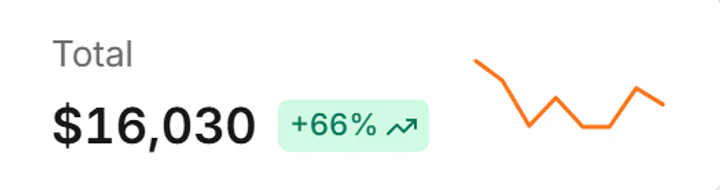
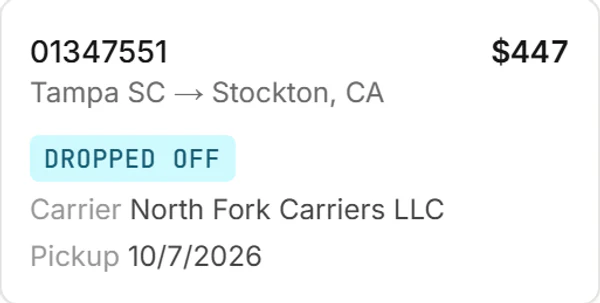
An example: the CRM our own team uses, shown with sample data
Why custom
Built around your work, not a template
Off-the-shelf CRMs are made for a generic sales team. Yours starts from how your business actually runs.
Your process, not a template
Stages, fields, documents and roles follow how your team works. Change them as you grow, without paying for features you never use.
Everything in one place
Leads, customers, jobs, files, notes and invoices together, instead of spread across spreadsheets, inboxes and five subscriptions.
Data you control
A standard PostgreSQL database with access rules enforced in the database itself, on a server you control or ours, exportable at any time.
Any industry
A CRM for the way your business runs
Every business tracks something different. A few of the CRMs we build; if yours isn’t here, tell us how your work moves.
Trucking and logistics
Loads, carriers, drivers, rate confirmations and invoices. The example on this page.
Real estate
Listings, buyers and sellers, showings, offers and closing documents.
Home services and contractors
Leads, estimates, jobs, crews, photos and invoices, from the first call to the final payment.
Clinics and wellness
Clients, appointments, referrals and follow-ups, with access limited by role.
Professional services
Clients, projects, time, documents and retainers for agencies, consultants and firms.
Insurance agencies
Prospects, policies, renewals and claims, with reminders before anything lapses.
Auto sales and transport
Vehicles, buyers, financing steps and deliveries in one pipeline.
Recruiting and staffing
Candidates, open roles, interviews, placements and client contacts.
Education and training
Students, enrollments, classes, payments and certificates.
Wholesale and ecommerce
Accounts, quotes, orders and reorders across your sales channels.
Nonprofits
Donors, volunteers, events and grants, with every gift on record.
Field sales and service
Territories, visits, quotes and follow-ups, on a phone.
An example
See a CRM we built in 60 seconds
The CRM we built for our own dispatch team: dashboards, a pipeline, a record page, accounts, invoices, access rules and the phone view. Yours follows your work instead.
60 seconds, no sound. Sample data throughout.
Everything in one place
What your team works with all day
Pipeline
Records move across the board as the work happens

Stats
Counts and trends at the top of every list

Money
Amounts and payment status on every record

Comments
The conversation stays on the record

Access
Sharing rules by person, team or role

The example, feature by feature
Our own CRM, built for our dispatch team
In our CRM the records are loads, carriers and drivers. In yours they are whatever your business runs on: deals, jobs, patients, properties or orders.
Pipelines
Every record, from new to done
See records as a list, a board, cards or a pipeline. Filter on any column, save the views your team uses and share them, and watch the trend lines above the list.
- List, Board, Cards and Pipeline views
- A filter on every column, plus an advanced filter
- Saved views shared with people or teams
- Counts and trends at the top of every list

Record pages
Everything about a record on one page
Details, people, money, dates and documents in one place. A checklist tracks the paperwork, comments keep the conversation on the record, and every change is logged with the old and new value.
- Document checklists with previews
- Comments with @mentions and attachments
- History of every field, old and new value
- Amounts worked out automatically

Accounts
Customers and partners, kept up to date
Company profiles with the details, documents and dates you need before work starts. Assign an owner, follow up from the record and see everything linked to it.
- Required documents as part of onboarding
- Dates that matter, like renewals and expiries
- An assigned owner and sales rep
- Related records linked together

Dashboards and reports
The numbers each role works toward
Admins, managers, staff and sales each get their own dashboard for any date range. Reports total what matters per person and export to CSV.
- A dashboard per role, with date ranges
- Recent activity limited to what each person may see
- Reports per person, with CSV export

Invoices
Invoices that follow the work
Create one invoice per job or one for several. Ready, sent, paid: the status carries over to every record on the invoice, so the team and billing see the same thing.
- One invoice per job or for several
- Ready for invoice → sent → paid
- Fees set automatically or by hand

Access
Who sees what, enforced by the database
Roles, teams with team leads, and sharing rules by person, team or role decide who may see and edit each kind of record. Sign-ins can be limited to your office networks, and only admins can delete.
- Roles for admins, managers, staff and sales
- Teams with team leads
- Sharing rules for view or edit
- IP allow lists and admin-only deletes

On the go
The same CRM on a phone
Tables turn into cards, the menu folds into a drawer and a record opens with everything on it. Light and dark modes, and themes for every taste.


Beyond your team
Logins for customers and partners
The people you work with see their part, and nothing else.
Portals for customers and partners
The people you work with sign in to their own records, upload documents and follow invoices. Our CRM has one for carriers and one for owners.
Notifications that matter
Mentions, assignments, comments and changes on the records you follow, in a live panel with pop-ups and per-person settings.
Two brands, one system
Run more than one brand from the same CRM: ours shows a different name and logo depending on the web address it is opened at.
Built to your list
Add what your team needs
The screens above are in the CRM we run today. These are the pieces businesses ask for next, and we build them into yours.
Email and texting
Templates, a shared inbox, text messages and daily digests of what changed.
Calls
Click to call and call logs through your phone provider.
Web forms and lead capture
Leads from your website and ads go straight into the pipeline.
Calendar and scheduling
Appointments and reminders tied to the record, synced with your calendar.
E-signatures
Agreements and forms signed online, stored on the record.
Payments
Invoices customers can pay online, marked paid by themselves.
Accounting sync
Invoices and payments sent to your accounting software.
AI assistant
Draft replies, read documents and sum up a record’s history.
Push notifications
Alerts on desktop and phone, even when the CRM is closed.
Your other tools
Connections to the industry software you already use, through their APIs.
Location tracking
Where your field team or vehicles are, on the record they are working on.
Your brand
Your company name, logo and web address on every screen.
How we build it
From a call to your team’s CRM
Step 1: A call about your workflow.
We go through how leads, customers and paperwork move through your team today, and where time gets lost.
Step 2: A written plan and quote.
The modules, screens, roles and data to move, with a price and a timeline, before any work starts.
Step 3: Built in stages.
Your team uses the first modules early and tells us what to change while the rest is built.
Step 4: Your data moved in.
Customers, contacts, deals, notes and files from spreadsheets or your current CRM, checked before you switch.
Step 5: Launch and support.
We train your team, watch the first weeks closely and keep adding what you need.
Moving in
We moved our own team off vTiger
Every user, account, record, comment and file came across, and people signed in with their old passwords on day one. We plan your move the same way.
Frequently asked questions
How much does a custom CRM cost?
It depends on the modules, the number of users and the data you bring, so we quote each project after a call. You get a written quote before any work starts. See how we approach custom software.
How long does it take to build?
The timeline comes with the quote. We build in stages, so your team can start on the first modules, usually contacts and the pipeline, while the rest is built.
Why build a CRM instead of using HubSpot, Salesforce or Zoho?
If one of them fits how you work, use it. A custom CRM makes sense when your process is what sets you apart, when your work doesn’t fit a sales-pipeline shape, or when you pay for seats and add-ons you barely use. Our guide to custom software vs off the shelf walks through the decision.
Can you move our data from spreadsheets or another CRM?
Yes. We moved our own team off vTiger: users, accounts, records, comments and files, and people kept their old sign-ins. Spreadsheets, CSV exports and most CRMs can be moved the same way.
Which industries do you build CRMs for?
Any business that tracks people and work through stages. Our own CRM runs a dispatch operation and an auto transport desk; the same building blocks fit real estate, contractors, agencies, insurance, recruiting, education and more.
Who can log in?
Your staff, each with a role, and if you want, your customers or partners through their own portals. Roles, teams and sharing rules decide what each person sees.
Where is it hosted, and who owns the data?
On a server you control or on ours, your choice. The data is yours: it sits in a standard PostgreSQL database and can be exported at any time.
Does it work on phones?
Yes, in the phone’s browser: lists become cards and records fit the screen. A native app can be added if your team needs one; see software and app development.
Can it connect to the tools we already use?
Usually, through those services’ APIs: email, phone systems, calendars, accounting, payment providers and industry software. Tell us what you use and we check what each one allows before we quote.
Let’s map your CRM
Tell us how your team works today. We show you our CRM and sketch what yours could look like.
Mon–Sat, 9:00 AM – 6:00 PM ET · We reply within one business day
Related services
Web apps, customer portals, CRMs and mobile apps built around how your business actually works.
Fast, mobile-first websites on WordPress, Shopify or custom code, built to turn visitors into calls and enquiries.
A clear technology roadmap tied to your business goals, built one-on-one with your team.
A natural-sounding AI voice agent that answers calls, qualifies leads and books appointments.